Best Practice3 August 2026· 11 min read

Post-Incident Review: A Practical Template and Process Guide

Why Post-Incident Reviews Are Worth the Time

The hours after an outage are the worst possible time to ask people to write a document. The service is back, everyone is exhausted, and the backlog that was paused during the incident is now louder than ever. It is tempting to declare victory, close the incident channel, and move on. Teams that do this reliably experience the same outage again a few months later, usually with a different trigger and an identical failure path.

A post-incident review, also called a post-mortem or an incident retrospective, is the mechanism that converts a bad afternoon into permanent organisational knowledge. It is the only part of the incident lifecycle where you get to think slowly. Detection, triage, and recovery all happen under pressure, with partial information and a clock running. The review is where you finally get to see the whole system, work out what actually happened, and change something so the next occurrence is smaller, shorter, or prevented entirely.

The payoff is measurable. Reviews shorten future recovery times because the fixes they generate remove ambiguity from the next incident: better alerts, clearer runbooks, faster rollbacks. They spread hard-won context beyond the two or three engineers who happened to be on call. And done consistently, they build the kind of engineering culture where people report near misses instead of hiding them. This guide gives you a process and a template you can use directly, and it builds on the response workflow covered in our incident management guide.
Blameless by Default: The Cultural Foundation

Every useful post-incident review rests on one commitment: the review exists to improve the system, not to identify who is at fault. This is not politeness or corporate softness. It is a practical requirement, because a review that assigns blame gets bad data, and bad data produces useless fixes.

The mechanism is simple. If engineers believe that admitting "I ran that command without checking the target environment" will end up in a performance review, they will describe what happened in the vaguest possible terms. The write-up then misses the real contributing factor, which was that production and staging were one ambiguous flag apart in the same CLI. The system stays exactly as dangerous as it was, and the next person makes the same mistake.

Blameless does not mean consequence-free or uncritical. It means you treat human error as a symptom rather than a cause. Some practical rules that keep a review honest:

  • Assume everyone acted reasonably given what they knew at the time. Judge decisions on the information available in the moment, not on what became obvious afterwards.
  • Watch for hindsight bias. Phrases like "should have known" or "obviously" are a signal that you have stopped analysing and started judging.
  • Replace names with roles in the written narrative. "The on-call engineer restarted the service" carries the same information as a name, without turning the document into a record of an individual's mistake.
  • Treat "human error" as the start of the investigation, not the end. If someone typed the wrong thing, ask why the interface allowed it, why nothing caught it, and why the damage was so large.
  • Separate the review from any performance discussion. If those two things share a room, the review will be worthless.

The tone is set by whoever runs the meeting. A facilitator who opens by asking "what made this hard?" instead of "who did what?" gets a fundamentally different and far more useful conversation.

Building an Accurate Incident Timeline

The timeline is the spine of the review. Everything else, the analysis, the contributing factors, the action items, depends on having an accurate, timestamped account of what happened. Build it first, before anyone starts theorising about causes, because a good timeline routinely overturns the theory people arrived with.

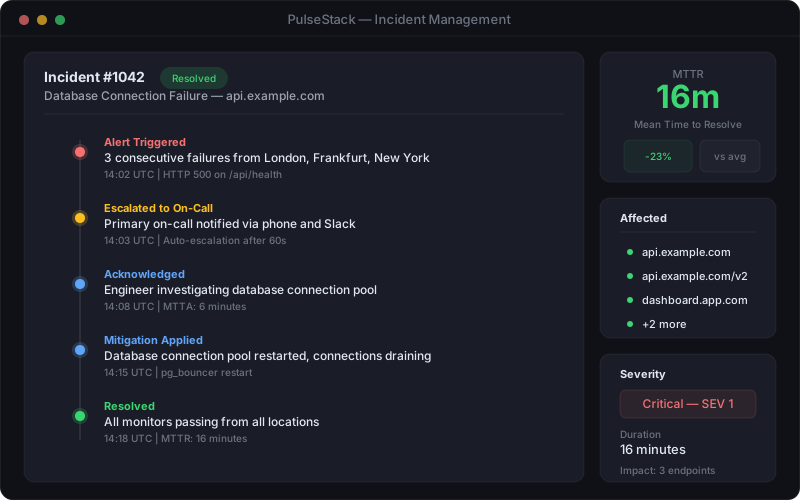
PulseStack incident timeline showing detection, acknowledgement, mitigation, and resolution events plotted in sequence with timestamps
A reconstructed incident timeline turns scattered evidence into a single sequence that everyone can reason about

Gather evidence from every source you have, and gather it early, before retention windows expire and before memories reshape themselves. Useful sources include monitoring alerts and check history, deployment and configuration change logs, application and infrastructure logs, chat transcripts from the incident channel, customer support tickets, and status page updates. Monitoring data is particularly valuable because it is objective and timestamped: it tells you exactly when a service started failing, which is often meaningfully earlier than when anyone noticed.

Record the key moments that every review needs, expressed in a single timezone (UTC is the safe default) and with real timestamps rather than vague relative descriptions:

  • Change or trigger: the deploy, config change, traffic shift, or external event that started it.
  • Impact begins: when users were first genuinely affected, which is rarely the same as when the alert fired.
  • Detection: when the problem was first noticed, and by what. Note explicitly whether monitoring caught it or a customer did.
  • Acknowledgement: when a human took ownership.
  • Diagnosis milestones: the moments understanding changed, including the false leads. The dead ends are some of the most valuable material in the whole document.
  • Mitigation: when impact stopped or was substantially reduced.
  • Resolution: when the system was fully healthy and the incident was formally closed.

The gaps between these moments are where the improvements hide. A long gap between impact and detection is a monitoring problem. A long gap between detection and acknowledgement is an alerting or on-call routing problem. A long gap between acknowledgement and mitigation is a tooling, access, or runbook problem. Each gap points at a different fix, which is exactly why decomposing your mean time to recovery into these phases is so much more useful than tracking it as one number.

The Post-Incident Review Template

A consistent template does two jobs. It stops important questions being skipped when everyone is tired, and it makes reviews comparable, so that six months later you can read across a dozen documents and spot the pattern. Copy the structure below and adapt the wording to your organisation.

1. Header. Incident ID, a short descriptive title, date, severity, duration of customer impact, the services affected, the author, and the review status (draft or final).

2. Summary. Three or four sentences in plain language that a non-engineer could follow. What broke, who was affected, for how long, and what fixed it. Most people will read only this section, so write it last and write it well.

3. Customer impact. Be specific and quantified. How many users, which regions, which features, and what did they actually experience: errors, slowness, incorrect data, or a total outage. Include support ticket volume and any commercial consequences such as failed transactions or breached service commitments. Vague impact statements let a serious incident be filed as minor.

4. Timeline. The timestamped sequence from the previous section, including the dead ends.

5. Contributing factors. The analysis of everything that had to be true for this incident to happen and to last as long as it did. Covered in detail in the next section.

6. What went well. Genuinely important and almost always skipped. If the rollback worked, the alert fired correctly, or the runbook was accurate, record it. These are the controls you must not accidentally remove later, and naming them keeps the review from feeling purely punitive.

7. What was difficult. The friction: missing dashboards, unclear ownership, an access request that took twenty minutes, a runbook that referenced a decommissioned server. This section produces the most immediately actionable fixes.

8. Where we got lucky. The near misses. It happened at 2pm on a Tuesday rather than during a sale. Someone who happened to know the legacy system was online. The blast radius stopped one dependency short of the payment service. Luck is not a control, and writing it down converts a piece of good fortune into a piece of planned work.

9. Action items. Specific, owned, dated, and tracked in your normal work system.

10. Supporting material. Links to graphs, logs, the incident channel, and any relevant change records.

Contributing Factors Beat a Single Root Cause

The phrase "root cause" quietly does a lot of damage. It implies that an incident has one cause, that finding it concludes the investigation, and that fixing it prevents recurrence. Real production failures almost never work like that. They happen when several conditions line up at the same moment, and any one of them being different would have produced a smaller incident or none at all.

Consider a typical outage. A deploy contained a query that performed badly under production data volumes. The staging dataset was too small to reveal it. The canary stage was skipped because the change looked trivial. Connection pool exhaustion had no alert on it, so detection waited for user reports. The rollback procedure was documented but had not been rehearsed in months. Name any single item as "the root cause" and you fix one link in a chain of five. Name all five, and you can choose which are cheapest and most valuable to address.

Techniques such as the "five whys" are useful for pushing past the first shallow answer, but they encourage a single linear chain and stop as soon as one satisfying answer appears. A better habit is to ask "why" repeatedly and allow branches, so one event can have several parents. It also helps to run through a fixed set of lenses, asking what contributed in each category:

  • Technical: the code, configuration, capacity, or architectural weakness itself.
  • Detection: why monitoring did not catch it sooner, or why the alert that did fire was not clear enough to act on.
  • Response: what slowed diagnosis or mitigation, including access, tooling, and documentation.
  • Process: the review, testing, or change management step that would normally have caught this and did not.
  • Organisational: unclear ownership, missing context, or a known risk that had been deprioritised.

One question deserves special attention every single time: would our monitoring have caught this on its own? If a customer told you before your tooling did, that is a finding in its own right, independent of whatever caused the failure. Detection gaps compound every future incident, so they usually deserve a higher priority than the specific bug that exposed them.

Action Items That Actually Get Done

The graveyard of incident reviews is full of excellent analysis followed by action items that nobody ever completed. A review with unfinished actions is worse than no review, because it consumed real time and produced the illusion of improvement. Treat completion as the actual output of the process, not the document.

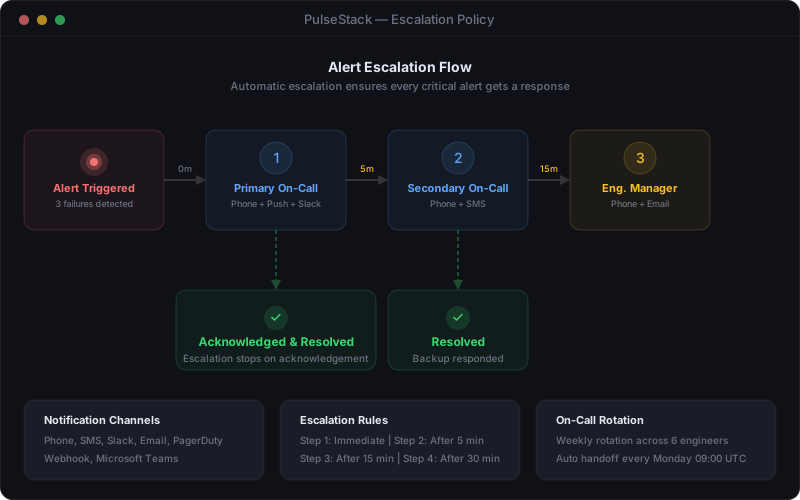
PulseStack alert escalation flow diagram showing how an unacknowledged alert routes through primary and secondary on-call responders
Many post-incident actions target the response path itself: better routing, clearer escalation, and alerts that reach the right person first

Good action items share a few properties. They are specific enough to be verifiable, so "add an alert on database connection pool utilisation above 80 percent" rather than "improve database monitoring". They have exactly one named owner, because an item owned by a team is owned by nobody. They carry a due date proportional to severity. They live in the same tracker as the rest of your engineering work, tagged so they can be found later, rather than in a document that will never be opened again. And there are few of them: three well-chosen actions that ship beat fifteen that decay.

It also helps to classify each action by what it changes, because a healthy set is balanced across the incident lifecycle rather than clustered on prevention:

  • Prevent: stop this class of failure from occurring at all.
  • Detect: catch it faster next time, usually a new or better-tuned check. This is frequently the highest return per hour of effort.
  • Mitigate: reduce the blast radius or make recovery faster, such as a rehearsed rollback or a feature flag.
  • Respond: improve the human path, including runbooks, escalation routing, and access. These tie directly into your on-call practices.

Finally, review the actions in your normal planning cadence and report the completion rate. A simple monthly figure showing what proportion of incident actions closed on time turns an invisible process into a visible one, and visible processes get resourced. Where an action is genuinely not worth doing, close it explicitly with a reason. An honest "we accept this risk" is far healthier than a ticket quietly rotting for a year.

Sharing the Findings Inside and Outside

A review that only its authors read has captured knowledge without distributing it. The distribution step is what turns one team's painful afternoon into an improvement across the whole engineering organisation.

Internally, publish reviews somewhere searchable and open by default. Engineers investigating a strange failure should be able to search past incidents and find that someone hit something similar eighteen months ago. Over time, the archive becomes one of the most valuable pieces of technical documentation you own, precisely because it records how the system behaves under stress rather than how it was designed to behave.

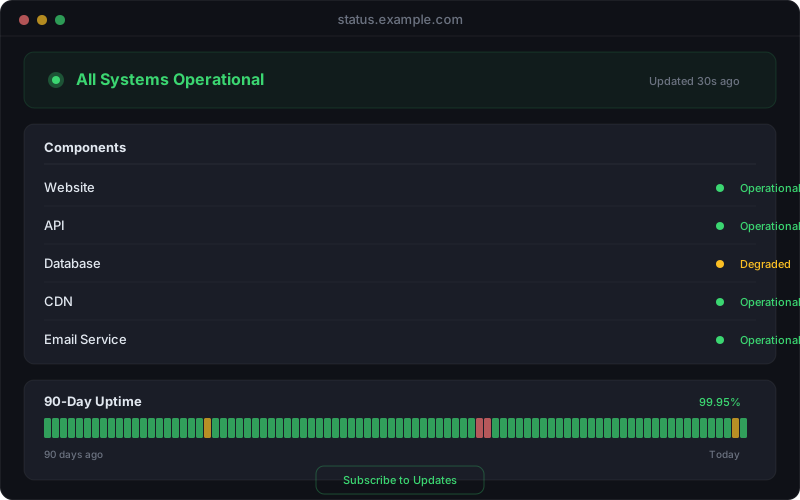
PulseStack status page layout showing a resolved incident entry with a public summary and update history
Public incident summaries close the loop with customers and turn an outage into evidence that the problem was taken seriously

Externally, a public summary is appropriate whenever customers were meaningfully affected, and it is worth far more than most teams expect. Customers largely accept that systems fail; what erodes trust is silence and evasion. A public write-up should say plainly what happened, acknowledge the impact without minimising it, explain what you are changing, and skip the internal detail and anything that would create a security risk. Keep it free of defensive language. Your status page is the natural home for it, linked from the resolved incident so the record stays together.

The volume is worth calibrating. Not every incident needs a full review. Set a clear trigger: any incident above a defined severity, any customer-visible outage beyond a set duration, and any near miss that could easily have been much worse. Below that line, a short note is enough. Reviewing everything guarantees that reviews become a chore performed badly.

Making the Practice Stick

Post-incident reviews fail for predictable reasons, and most of them are fixable. They get written too late, when the details have blurred, so hold the review within a few days while evidence is fresh but after everyone has slept. They get written by one exhausted person in isolation, so involve the responders and let the facilitator be someone who was not deeply involved. They turn into blame, so protect the blameless framing actively rather than assuming it. They generate too many actions, so cut ruthlessly to the few that matter. And they stop at the document, so track the actions like real work.

The strongest indicator that the practice is working is not the quality of the writing. It is whether incidents change over time: the same class of failure stops recurring, detection moves earlier, and recovery gets shorter. If you are running reviews diligently but seeing the same shapes of incident every quarter, the analysis is probably stopping at the technical layer and not reaching the detection and process layers underneath.

Good detection is the foundation the whole process rests on. The most common finding in any honest review is that the problem was live for longer than anyone realised before a human noticed, and that gap is almost always the cheapest one to close. PulseStack monitors uptime, response time, SSL certificates, and domain expiry from multiple locations, with alerting that reaches the right person quickly, so your reviews start from an accurate timeline instead of a guess. Explore the incident management tooling, see how website monitoring underpins detection, or review the plans to find the right fit. The best review you can write is the one that turns your next outage into a much shorter, much quieter event.

Start monitoring your infrastructure today

50 free monitors, no credit card needed. Set up in under 30 seconds.

Get started free