Guide17 August 2026· 11 min read

E-commerce Website Monitoring: Protecting Revenue at Every Step of Checkout

On an Online Store, Downtime Has a Price Tag

Most websites lose something vague when they go down: goodwill, a few leads, a bit of search visibility. An online store loses money at a rate you can calculate to the minute. If the shop turns over 40,000 in a normal trading day, every minute the checkout is broken costs roughly 28 in orders that will not simply arrive later. Some of those customers come back. Many buy from a competitor and never return.

That directness makes e-commerce monitoring a different discipline from general uptime checking. The question is not "is the site up?" It is "can a customer complete a purchase right now, from where they are, on the device they are using, with the payment method they prefer?" Those are very different questions, and a plain HTTP check on the homepage answers only the easiest one.

Retail teams learn this the hard way. The homepage returns a healthy 200 while the basket page throws a JavaScript error on Safari. The catalogue loads perfectly while the payment provider silently rejects every card from one issuer. The site is fast in London and unusable in Sydney. In each case the monitoring dashboard is a wall of green and the revenue graph is falling off a cliff.

E-commerce website monitoring means watching the path to purchase rather than the server that happens to host it. This guide covers how to map that path, what to monitor at each step, how to set speed thresholds that actually protect conversion, how to handle the third-party services that sit inside your checkout, and how to prepare for the trading days where an hour of downtime costs more than a year of monitoring ever will.
Map the Revenue Path Before You Add Monitors

Before configuring anything, write down the sequence a customer moves through to give you money. For most stores it looks something like this: landing page, category or search results, product detail page, add to basket, basket view, checkout form, address and delivery selection, payment authorisation, order confirmation, confirmation email.

That list is your monitoring specification. Each step is a place where revenue can stop, and each one fails in its own way. A useful exercise is to note, next to every step, what breaks it and what the customer sees when it does:

  • Product pages fail through slow image delivery, missing stock data from an ERP integration, or a review widget that blocks rendering.
  • Add to basket fails through session or cookie problems, cart service timeouts, and inventory checks that hang rather than error.
  • Checkout fails through form validation bugs, address lookup APIs, tax and shipping calculation services, and fraud screening that starts rejecting good customers.
  • Payment fails through gateway outages, expired API credentials, 3D Secure redirects that break on mobile, and issuer-specific declines that look like customer error.
  • Confirmation fails through email delivery problems and order sync failures, where the customer is charged but the warehouse never hears about it.

Two things usually emerge from this exercise. The first is that most of the critical path runs through software you do not operate, which makes third-party dependency monitoring a core part of retail reliability rather than an advanced topic. The second is that the highest-value monitors are almost never on the homepage. They are on the four or five URLs deepest in the funnel, where the traffic is smallest and the revenue per visit is highest.

Set your check intervals to match the value of the step. A marketing blog post can be checked every five minutes. A basket endpoint handling thousands of pounds an hour should be checked every thirty to sixty seconds, because on that page the difference between a one-minute and a five-minute detection window is measured in lost orders.

Uptime Is the Floor, Speed Is the Revenue

Retail is the sector where the link between page speed and money is best documented, and the relationship is not linear. Conversion tends to hold reasonably steady up to about a second, degrades noticeably between one and three seconds, and falls sharply beyond that. A store that never goes down but consistently serves a four-second product page is losing more revenue over a year than most outages ever cost it.

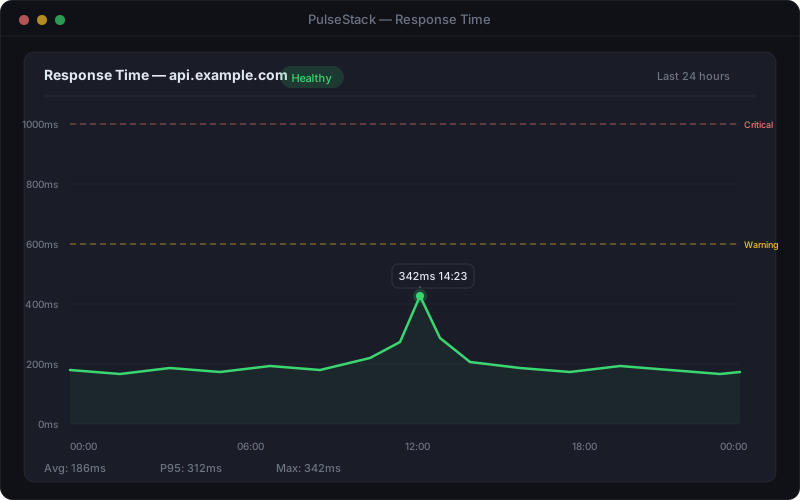
This means an e-commerce monitoring setup that only records up or down is measuring the wrong variable. You want response time recorded on every check, thresholds set per page type, and alerting on sustained degradation rather than only on total failure.

PulseStack response time chart showing checkout page latency against configured warning and critical thresholds across a trading day
Response time trends on revenue-critical pages reveal degradation days before it becomes an outage

Sensible starting thresholds for a typical store, to be tuned against your own baseline rather than adopted blindly:

  • Product and category pages: warn at 1.5 seconds, critical at 3 seconds. These carry the most traffic and the most paid acquisition spend.
  • Basket and checkout: warn at 2 seconds, critical at 4 seconds. Customers here have higher intent and tolerate slightly more, but abandonment still rises fast.
  • Search: warn at 1 second. Slow search reads as "no results" to a shopper who has already moved on.
  • Payment authorisation: warn at 5 seconds. This step legitimately takes longer, and alerting too early only creates noise.

Watch the trend as carefully as the threshold. Response times that have crept from 800ms to 1.4 seconds over six weeks are telling you about an unindexed query or a growing catalogue, and that is a problem you can fix calmly on a Tuesday instead of urgently on a Friday night. The guide to setting response time thresholds covers why percentiles beat averages here: a mean of 900ms can comfortably hide a 95th percentile of six seconds, and that slowest five percent contains a disproportionate share of your customers on poor mobile connections.

Certificates, Payments, and the Trust Layer

Nothing destroys a purchase faster than a browser security warning. On a content site an expired certificate is embarrassing. On a store it is a full stop: the customer is being told, by their own browser, not to hand over card details. Conversion goes to zero and stays there until somebody notices and renews.

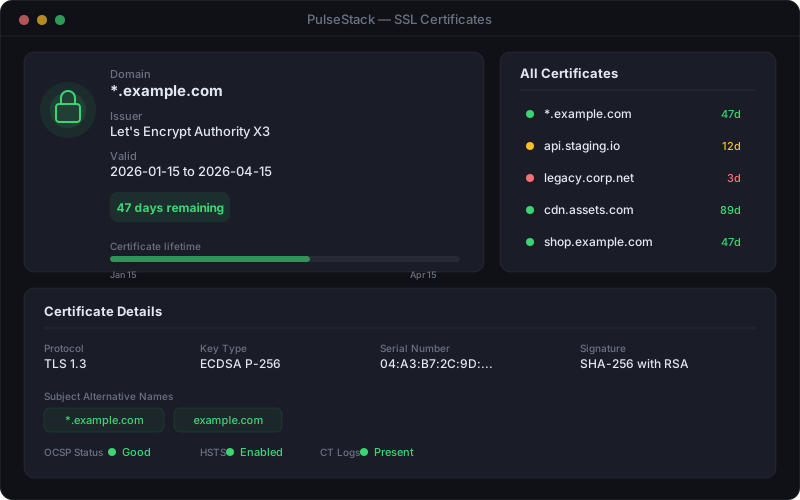
PulseStack SSL certificate monitoring panel showing expiry dates, issuer details, and days remaining for monitored e-commerce domains
Certificate expiry is one of the few outages that announces itself weeks in advance, provided something is watching

Certificate expiry is entirely preventable and still one of the most common causes of retail downtime, largely because automated renewal creates a false sense of safety. Renewal fails quietly more often than teams expect: a DNS validation record changes, a renewal cron stops after a server migration, or the certificate renews on the load balancer but not on the origin behind it. SSL certificate monitoring should alert at 30, 14, and 7 days remaining, and it should cover every hostname that participates in a purchase, including the checkout subdomain, the CDN hostname, and any separate payment or account domains.

The rest of the trust layer deserves the same attention:

  • Payment gateway endpoints: monitor the gateway's own API, not just your checkout page. You want to know it is degrading before customers discover it for you.
  • Mixed content: a single asset loaded over HTTP on an HTTPS checkout page triggers browser warnings and can block the request entirely.
  • Redirects: verify that the non-www to www and HTTP to HTTPS chains still resolve correctly after every deployment. Broken canonical redirects quietly damage both conversion and rankings.
  • Domain expiry: the rarest failure and the most catastrophic. A lapsed domain takes down the store, the email, and your ability to fix either.

Your Customers Are Not Where Your Server Is

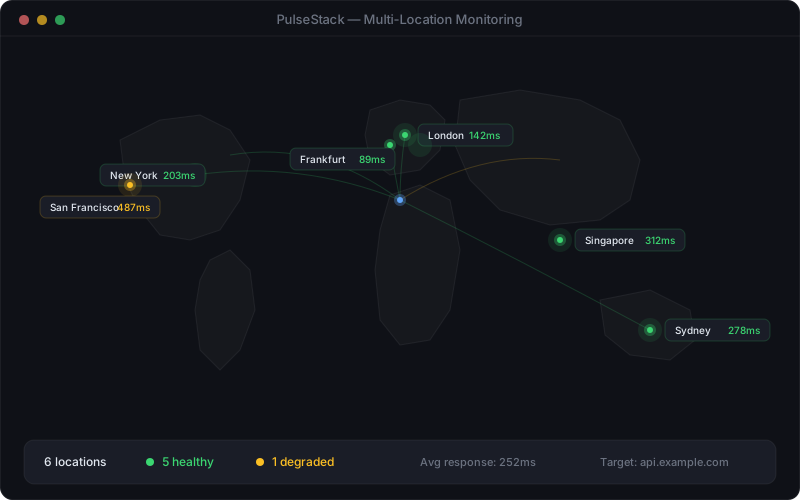
An online store sells to anyone with a card, which makes availability a geographic question. A single monitoring location tells you whether the site works from that location, and nothing more. Regional CDN failures, DNS propagation problems, and network routing issues routinely affect one continent while leaving another perfectly healthy.

PulseStack multi-location monitoring map showing check results from separate geographic regions with one region reporting degraded performance
Checking from several regions separates a real outage from a local network problem, and catches failures affecting only part of your customer base

Choose monitoring locations that reflect where your orders come from rather than where your infrastructure lives. If a fifth of revenue comes from a market on another continent, that market needs its own checks. Multi-location monitoring also solves a practical problem: it distinguishes a genuine outage from a monitoring artefact. When one location reports a failure and five others report success, you have a network problem at that location. When all six fail together, you have an incident.

The same logic applies to devices. If most of your traffic is mobile, monitoring only the desktop experience is monitoring the minority. Checks that verify the mobile page renders its key elements, and that the mobile checkout does not depend on a script that fails on older browsers, protect the majority of real sessions.

The Failures That Never Produce an Error Page

The most expensive e-commerce failures do not return a 500. They return a perfectly valid 200 with something wrong inside it. Status code monitoring alone will never catch them, which is why content assertions matter more in retail than almost anywhere else.

The recurring patterns are worth knowing by name:

  • The empty catalogue. A search index or product feed fails and every category page renders successfully with zero products. HTTP 200, correct template, no revenue.
  • The broken add-to-basket button. A JavaScript bundle change breaks the click handler. The page loads flawlessly and nothing can be added to the cart.
  • Everything out of stock. An inventory sync fails and defaults to zero, hiding the entire range behind an unavailable label.
  • Wrong prices. A pricing service failure falls back to zero, to a default, or to last month's promotional rate. This one can cost more than an outage, because the orders complete.
  • The silent payment decline. Authorisation fails for a specific card type or region while the rest of checkout behaves normally.
  • The missing confirmation. Orders are captured and paid for, but confirmation emails stop and the warehouse feed goes quiet. Nothing appears broken until the support queue fills two days later.

Defend against these with checks that assert on content, not just on status. A basket monitor should confirm the page contains the expected basket markup. A product page monitor should confirm a price string and an add-to-basket control are present. A category monitor should confirm the result count is above zero. Where the platform allows it, run a periodic synthetic transaction that completes a real purchase through a test payment method and then cancels it. It is the only check that exercises the full path end to end.

Pair this with business metric alerting. Orders per hour is the most honest monitor an e-commerce business has. If the number falls to zero at eleven in the morning, something is broken regardless of what every technical check says. Plenty of retail incidents are caught first by a sharp-eyed person looking at a sales dashboard, and that observation deserves to be automated rather than left to luck. See synthetic monitoring versus real user monitoring for how proactive checks and real session data cover each other's blind spots.

Peak Trading Days Need a Different Playbook

Black Friday, launch days, and seasonal peaks concentrate a disproportionate share of annual revenue into a handful of hours, and they break systems in ways normal trading never does. An outage that costs 500 in March can cost 50,000 on the last Friday in November. The monitoring you run during peak should be deliberately different from the monitoring you run the rest of the year.

A practical peak readiness sequence, starting several weeks out:

  1. Load test against production-like capacity and record what breaks first. Whatever that is, put a monitor on it.
  2. Tighten check intervals on basket, checkout, and payment for the peak window. Thirty-second checks are a rounding error in cost and a meaningful difference in detection time.
  3. Review every threshold against expected peak load. Response times will legitimately rise, and thresholds tuned for a quiet Tuesday will page constantly for problems nobody can act on.
  4. Confirm certificate expiry dates fall well outside the trading window. Never let one renew during peak season.
  5. Verify third-party capacity in writing. Payment gateways, address lookup services, and email providers have their own limits, and your rate limits may need raising in advance.
  6. Publish and rehearse a status page before you need it. Writing your first incident update while the site is down is the worst possible time to be deciding on tone.
  7. Staff on-call properly, with a named decision maker who can authorise disabling a feature or switching to a fallback without convening a meeting.

Decide the degradation ladder in advance. Which features can you switch off to keep checkout alive? Recommendations, live chat, reviews, and personalisation can usually be disabled without meaningfully affecting conversion, and each one removes a dependency and some load. A store that can shed non-essential features under pressure survives peaks that take down stores treating every component as mandatory.

Alerting, Ownership, and the 2am Question

Retail alerting has one advantage over most domains: the severity question is easy to answer, because you can attach a number to it. Sort alerts by revenue impact per minute and the routing becomes obvious.

  • Wake someone immediately: checkout down, payment authorisation failing, certificate expired, the whole site unreachable from multiple locations, orders per hour at zero.
  • Notify during business hours: a single region slow, search degraded, response times above warning but below critical, a certificate expiring in two weeks.
  • Log and review weekly: individual slow checks, isolated timeouts, cosmetic third-party failures.

The middle tier is where most teams get it wrong, and where alert fatigue begins. Every alert that fires without anyone acting on it teaches the team that alerts do not require action, and that lesson gets applied to the real one eventually. If nobody has acted on a given alert in three months, it is a dashboard item, not a page.

Require confirmation before paging. A monitor that alerts after two or three consecutive failures from more than one location eliminates most false positives at the cost of about a minute of detection time, and that is a trade almost every retailer should take. Route alerts to whoever can actually fix them: payment failures to the developer who owns the integration, certificate warnings to whoever controls DNS, stock feed failures to the operations team who own the ERP link. A general alerts channel is where alerts go to be ignored.

Finally, treat every incident as information rather than an embarrassment. A short post-incident review that captures how long detection took, what the monitoring missed, and roughly what it cost turns each outage into a monitoring improvement. Over a year, that loop matters more than any single tool choice.

Where to Start

If you are starting from nothing, resist the urge to build a comprehensive monitoring estate in week one. The first five monitors deliver most of the value: the homepage, a representative product page with a content assertion on the price, the basket page, the checkout entry point, and the certificate on your primary domain. Add multi-location checks on the checkout, set response time thresholds from a fortnight of your own baseline data rather than from a blog post, and route the critical tier to a phone rather than an inbox.

From there, expand along the revenue path. Add the payment gateway endpoint, the search service, the stock feed, and any third-party API sitting inside checkout. Add an order volume alert. Publish a status page before your next peak. Each addition should answer a question you could not previously answer during an incident.

The measure of a good e-commerce monitoring setup is not how many checks it runs. It is how quickly you learn that customers cannot buy, and how much of the diagnosis is already done by the time you open the laptop. For most stores the cost of getting that right is trivial next to the cost of a single unnoticed outage.

PulseStack monitors the full path to purchase: HTTP and content checks on the pages carrying your revenue, certificate expiry warnings weeks ahead, checks from multiple regions, response time thresholds tuned per monitor, and alert routing that reaches the person who can fix it. See how website monitoring works in practice, review the full feature set, or compare plans to find the right fit for your store.

Start monitoring your infrastructure today

50 free monitors, no credit card needed. Set up in under 30 seconds.

Get started free